이 글은 누구를 위한 것인가
- LLM 기반 기능을 프로덕션에 올렸지만 품질을 어떻게 측정해야 할지 모르는 팀
- 모델을 업그레이드할 때마다 "이전보다 나빠진 건 없나?" 수동으로 확인하는 엔지니어
gpt-4o→claude-3.7같은 모델 마이그레이션을 안전하게 하고 싶은 AI 개발자
왜 LLM Eval이 어려운가
소프트웨어 테스트는 assert output == expected_output 으로 끝난다. LLM은 그렇지 않다.
- 비결정적: 동일 입력도 매번 다른 출력
- 정답이 모호함: "좋은 요약"의 기준은 사람마다 다름
- 다차원 품질: 정확성, 유창성, 안전성, 지연시간이 모두 다른 지표
- 배포 후 드리프트: 파인튜닝, 모델 버전 업데이트로 조용히 품질이 변함
그래서 LLM Eval은 테스트 가 아니라 측정 시스템에 가깝다.
1. Eval 지표 설계
정량 지표 (Automated Metrics)
코드로 자동 측정할 수 있는 지표들이다.
| 지표 | 설명 | 도구 |
|---|---|---|
| Exact Match | 출력이 기대값과 정확히 일치 | 직접 구현 |
| F1 Score | 토큰 수준 정밀도·재현율 | 직접 구현 |
| ROUGE-L | 요약 품질 (최장 공통 부분열) | rouge-score |
| BERTScore | 의미적 유사도 (임베딩 기반) | bert-score |
| Latency | p50/p95/p99 응답 시간 | 프로메테우스 |
| Token Usage | 입력/출력 토큰 수, 비용 | API 메타데이터 |
모델 기반 평가 (LLM-as-a-Judge)
정량 지표로 측정하기 어려운 품질은 더 강력한 LLM을 판단자로 사용한다.
JUDGE_PROMPT = """
다음 기준으로 응답을 1~5점으로 평가하세요.

[기준]
1점: 완전히 틀리거나 해롭다
2점: 대체로 부정확하거나 불완전하다
3점: 부분적으로 정확하지만 개선 필요
4점: 대체로 정확하고 유용하다
5점: 완전히 정확하고 탁월하다

[입력]
{input}

[응답]
{output}

[참조 답변]
{reference}

점수(숫자만)와 한 줄 이유를 JSON으로 반환하세요.
{{"score": <1-5>, "reason": "<이유>"}}
"""

async def judge_response(
    input_text: str,
    output_text: str,
    reference: str,
    judge_model: str = "claude-opus-4-6"
) -> dict:
    response = await anthropic_client.messages.create(
        model=judge_model,
        max_tokens=200,
        messages=[{
            "role": "user",
            "content": JUDGE_PROMPT.format(
                input=input_text,
                output=output_text,
                reference=reference
            )
        }]
    )
    return json.loads(response.content[0].text)
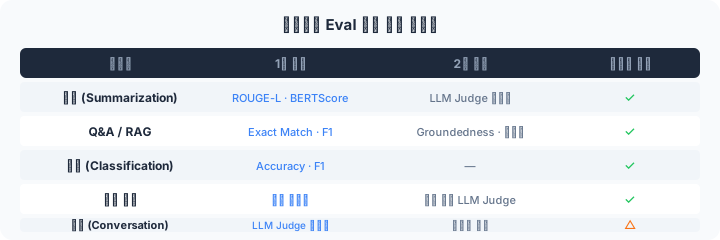
태스크별 지표 선택
| 태스크 | 1차 지표 | 2차 지표 |
|---|---|---|
| 요약 | ROUGE-L, BERTScore | LLM-Judge 충실도 |
| Q&A / RAG | Exact Match, F1 | Groundedness, 환각률 |
| 분류 | Accuracy, F1 | — |
| 코드 생성 | 실행 성공률 | 코드 품질 LLM-Judge |
| 대화 | LLM-Judge 유용성 | 안전성 점수 |
2. Eval 데이터셋 관리
골든 데이터셋 구성
Eval은 대표성 있는 골든 데이터셋이 핵심이다.
@dataclass
class EvalCase:
    id: str
    input: str                    # 입력 (프롬프트 + 컨텍스트)
    expected_output: str          # 기대 출력 (참조 답변)
    tags: list[str]               # 케이스 분류 태그
    difficulty: Literal['easy', 'medium', 'hard']
    added_by: str
    added_at: datetime
    notes: str | None = None

# 데이터셋 저장 구조
# evals/
#   datasets/
#     summarization-v2.jsonl
#     qa-finance-v1.jsonl
#     safety-adversarial-v3.jsonl
데이터셋 품질 원칙
| 원칙 | 설명 |
|---|---|
| 대표성 | 실제 프로덕션 트래픽 분포를 반영한다 |
| 경계 케이스 포함 | 쉬운 케이스만 있으면 회귀를 못 잡는다 |
| 버전 관리 | 데이터셋 변경도 Git으로 추적한다 |
| 무결성 | 참조 답변이 정말 최선인지 주기적으로 검토한다 |
3. Eval 파이프라인 아키텍처
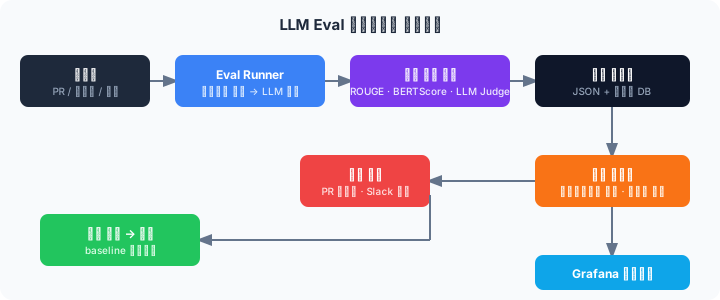
Git Push / 스케줄
  │
  ▼
[Eval Runner]
  │  데이터셋 로드
  │  병렬 LLM 호출
  │  지표 계산
  ▼
[Result Store]
  │  results/run-{timestamp}.json
  │  시계열 DB (Prometheus / InfluxDB)
  ▼
[Regression Detector]
  │  이전 베이스라인과 비교
  │  임계값 이하면 실패 판정
  ▼
[Report & Alert]
  │  PR 코멘트 / Slack 알림
  └─ Grafana 대시보드
Eval Runner 구현
import asyncio
from dataclasses import dataclass, field
from typing import Callable

@dataclass
class EvalConfig:
    dataset_path: str
    model: str
    system_prompt: str
    metrics: list[str]            # ["rouge", "bertscore", "llm_judge"]
    max_concurrency: int = 10
    judge_model: str = "claude-opus-4-6"

@dataclass
class EvalResult:
    run_id: str
    model: str
    dataset: str
    metrics: dict[str, float]     # 지표별 평균값
    per_case_results: list[dict]
    total_tokens: int
    estimated_cost_usd: float
    duration_seconds: float

async def run_eval(config: EvalConfig) -> EvalResult:
    dataset = load_dataset(config.dataset_path)
    semaphore = asyncio.Semaphore(config.max_concurrency)

    async def evaluate_case(case: EvalCase) -> dict:
        async with semaphore:
            output = await call_llm(
                model=config.model,
                system=config.system_prompt,
                user=case.input,
            )
            scores = {}

            if "rouge" in config.metrics:
                scores["rouge_l"] = compute_rouge_l(output.text, case.expected_output)

            if "llm_judge" in config.metrics:
                judgment = await judge_response(
                    input_text=case.input,
                    output_text=output.text,
                    reference=case.expected_output,
                    judge_model=config.judge_model,
                )
                scores["judge_score"] = judgment["score"]
                scores["judge_reason"] = judgment["reason"]

            return {
                "case_id": case.id,
                "input": case.input,
                "output": output.text,
                "expected": case.expected_output,
                "scores": scores,
                "tokens": output.usage.total_tokens,
                "latency_ms": output.latency_ms,
            }

    start = time.time()
    results = await asyncio.gather(*[evaluate_case(c) for c in dataset])

    return EvalResult(
        run_id=generate_run_id(),
        model=config.model,
        dataset=config.dataset_path,
        metrics=aggregate_metrics(results),
        per_case_results=results,
        total_tokens=sum(r["tokens"] for r in results),
        estimated_cost_usd=calculate_cost(config.model, results),
        duration_seconds=time.time() - start,
    )
4. 회귀 감지 (Regression Detection)
새 모델 버전이나 프롬프트 변경 후 품질이 떨어지는 회귀를 자동으로 감지한다.
베이스라인과 비교
@dataclass
class RegressionReport:
    passed: bool
    regressions: list[RegressionItem]
    improvements: list[RegressionItem]
    summary: str

@dataclass
class RegressionItem:
    metric: str
    baseline_value: float
    current_value: float
    delta: float
    delta_pct: float

REGRESSION_THRESHOLDS = {
    "rouge_l": 0.02,        # 2% 이상 하락 시 실패
    "judge_score": 0.15,    # 0.15점 이상 하락 시 실패
    "p95_latency_ms": 500,  # 500ms 이상 증가 시 실패
}

def detect_regression(
    baseline: EvalResult,
    current: EvalResult,
) -> RegressionReport:
    regressions = []
    improvements = []

    for metric, threshold in REGRESSION_THRESHOLDS.items():
        baseline_val = baseline.metrics.get(metric, 0)
        current_val = current.metrics.get(metric, 0)
        delta = current_val - baseline_val

        item = RegressionItem(
            metric=metric,
            baseline_value=baseline_val,
            current_value=current_val,
            delta=delta,
            delta_pct=delta / baseline_val * 100 if baseline_val else 0,
        )

        # 레이턴시는 증가가 회귀
        if metric.endswith("latency_ms"):
            if delta > threshold:
                regressions.append(item)
            elif delta < -threshold:
                improvements.append(item)
        # 나머지는 감소가 회귀
        else:
            if delta < -threshold:
                regressions.append(item)
            elif delta > threshold:
                improvements.append(item)

    return RegressionReport(
        passed=len(regressions) == 0,
        regressions=regressions,
        improvements=improvements,
        summary=format_summary(regressions, improvements),
    )
5. CI/CD 통합
GitHub Actions 통합
# .github/workflows/llm-eval.yml
name: LLM Eval

on:
  pull_request:
    paths:
      - 'src/prompts/**'
      - 'src/ai/**'
  push:
    branches: [main]

jobs:
  eval:
    runs-on: ubuntu-latest
    steps:
      - uses: actions/checkout@v4

      - name: Run eval
        env:
          ANTHROPIC_API_KEY: ${{ secrets.ANTHROPIC_API_KEY }}
        run: |
          python -m evals.run \
            --config evals/configs/production.yaml \
            --output evals/results/run-${{ github.sha }}.json

      - name: Check regression
        id: regression
        run: |
          python -m evals.check_regression \
            --baseline evals/baselines/main.json \
            --current evals/results/run-${{ github.sha }}.json \
            --output regression-report.json

      - name: Comment PR
        if: github.event_name == 'pull_request'
        uses: actions/github-script@v7
        with:
          script: |
            const report = require('./regression-report.json');
            const emoji = report.passed ? '✅' : '❌';
            const body = `## ${emoji} LLM Eval Report\n\n${report.summary}`;
            github.rest.issues.createComment({
              issue_number: context.issue.number,
              owner: context.repo.owner,
              repo: context.repo.repo,
              body,
            });

      - name: Fail if regression detected
        if: steps.regression.outputs.passed != 'true'
        run: |
          echo "Regression detected. See PR comment for details."
          exit 1
베이스라인 업데이트 전략
새 모델/프롬프트 PR 생성
  │
  ├─ Eval 자동 실행
  │
  ├─ 회귀 없음 → PR 승인 가능
  │           → main 머지 후 baseline 업데이트
  │
  └─ 회귀 감지 → PR 블로킹
              → 원인 분석 후 재시도
6. 온라인 평가 (Production Monitoring)
CI Eval은 배포 전 게이트이고, 프로덕션에서는 온라인 평가가 필요하다.
샘플링 전략
모든 요청을 평가하면 비용이 폭등한다. 샘플링으로 비용을 제어한다.
class OnlineEvalSampler:
    def __init__(self, sample_rate: float = 0.05):
        self.sample_rate = sample_rate  # 5% 샘플링

    def should_eval(self, request_id: str) -> bool:
        # 해시 기반 결정론적 샘플링 (동일 요청 ID는 항상 동일 결과)
        hash_val = int(hashlib.md5(request_id.encode()).hexdigest(), 16)
        return (hash_val % 100) < (self.sample_rate * 100)

async def handle_llm_request(request: LLMRequest) -> LLMResponse:
    response = await call_llm(request)

    if sampler.should_eval(request.id):
        # 비동기로 평가 (응답 지연 없음)
        asyncio.create_task(
            eval_and_log(request, response)
        )

    return response
임계값 알림
# 실시간 품질 저하 감지
async def check_quality_alert(window_minutes: int = 60) -> None:
    recent_evals = await eval_store.get_recent(window_minutes)

    if len(recent_evals) < 10:  # 샘플 수 부족
        return

    avg_score = statistics.mean(e.judge_score for e in recent_evals)

    if avg_score < ALERT_THRESHOLD:
        await slack.send_alert(
            channel="#ai-alerts",
            message=f"LLM quality degradation detected! "
                    f"Avg judge score: {avg_score:.2f} (threshold: {ALERT_THRESHOLD})"
        )
7. Eval 비용 관리
LLM-as-a-Judge는 비용이 크다. 스마트하게 줄이는 방법들이다.
| 전략 | 효과 |
|---|---|
| 정량 지표 선필터링 | ROUGE 낮은 케이스만 Judge 실행 |
| 소형 Judge 모델 | Haiku 4.5로 1차 판단, 경계값만 Opus로 재판단 |
| 캐싱 | 동일 입력+출력 조합은 결과 재사용 |
| 배치 처리 | Messages Batches API 사용 (50% 비용 절감) |
# Anthropic Messages Batches API 활용
async def batch_judge(cases: list[EvalCase]) -> list[dict]:
    requests = [
        {
            "custom_id": case.id,
            "params": {
                "model": "claude-haiku-4-5-20251001",
                "max_tokens": 200,
                "messages": [{"role": "user", "content": make_judge_prompt(case)}],
            }
        }
        for case in cases
    ]

    batch = await anthropic_client.beta.messages.batches.create(requests=requests)

    # 배치 완료 대기 (폴링)
    while batch.processing_status != "ended":
        await asyncio.sleep(60)
        batch = await anthropic_client.beta.messages.batches.retrieve(batch.id)

    results = {}
    async for result in anthropic_client.beta.messages.batches.results(batch.id):
        results[result.custom_id] = json.loads(result.result.message.content[0].text)

    return [results[case.id] for case in cases]
8. 실무 도입 로드맵
| 단계 | 작업 | 예상 효과 |
|---|---|---|
| 1단계 | 골든 데이터셋 50~100개 구성 | Eval 기반 마련 |
| 2단계 | ROUGE + Latency 자동 측정 | 배포 게이트 설정 |
| 3단계 | LLM-as-a-Judge 추가 | 품질 측정 정밀도 향상 |
| 4단계 | CI/CD PR 게이트 통합 | 회귀 자동 차단 |
| 5단계 | 온라인 평가 + Grafana 대시보드 | 프로덕션 실시간 모니터링 |
마치며
LLM Eval을 도입하기 전, 팀에서 가장 자주 듣는 말은 "지금 모델이 잘 되고 있는지 모르겠다" 다. 평가 파이프라인을 갖추면 이 질문에 숫자로 답할 수 있게 된다.
시작은 작게, 골든 데이터셋 50개와 ROUGE 하나로 충분하다. 파이프라인을 갖춘 뒤 지표를 늘려가는 것이 현실적인 경로다.